
01
Point at a leaf
Camera, or a photo from your gallery. Flash, zoom and crop if the light is bad.
ID, care plan and pet-safety — all free
One photo gives you the species, the watering schedule, and whether it can hurt your cat. The part other apps put behind a paywall.
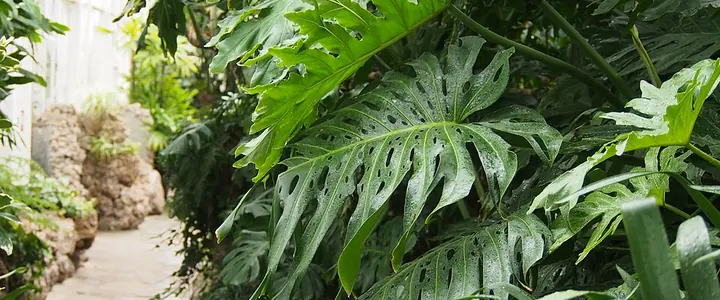
Center the leaf or flower in frame
 Free 3 times
Identifying…
Photo enhanced
Cross-checked with plant databases
Building your care plan
Checking pet & child safety
Monstera
Monstera deliciosa · Araceae
Pet & Child Safety
Care Basics
No sign-up wall, no questionnaire, no email. Open the camera and go.
01
Camera, or a photo from your gallery. Flash, zoom and crop if the light is bad.
02
Common name, scientific name and family. Top 3 matches with a percentage, so you can tell a guess from a certainty.
03
Watering rhythm, light, temperature, humidity and soil — plus a toxicity verdict for dogs, cats and kids.
The most common complaint in this whole category is the same sentence, over and over: “it told me what my plant was, then charged me to find out how to look after it.” So we put the care card, the schedule and the toxicity check on the free side of the line.
Gemini multimodal AI reads the photo and returns the species with a confidence percentage — plus the runners-up. When we’re not sure, the number says so instead of pretending.
Water rhythm, light, temperature, humidity and soil for that exact species — sourced from real plant databases, not one generic template applied to everything green.
Dogs, cats, children. Three plain verdicts before you decide where the pot goes. If it’s toxic, the app offers a similar-looking plant that isn’t.
Add it to My Garden with a nickname, room and pot size. Watering reminders arrive on schedule, and the streak counter turns keeping-things-alive into something you can win.
Every identification returns three separate verdicts: dogs, cats, children. Colour plus an icon plus a word, so it still reads correctly if you can’t distinguish red from green.
SAFE
Non-toxic to dogs, cats and children. Spider Plant, Basil, Calathea, Lavender, Mint.
MILD
Can irritate mouth or stomach if chewed. Put it up high and you’re fine.
DANGEROUS
Genuinely harmful if eaten — out of the house, not just out of reach. Monstera, Pothos, Peace Lily, Snake Plant, Aloe Vera.
Told your Monstera is toxic and you have a kitten? The app offers plants with a similar shape and habit that aren’t — so you don’t have to choose between the look you wanted and the animal you live with.
Browse and search with pet-safe switched on, so everything you see is already cleared. Also filter by indoor / outdoor, light, water need, edible, and difficulty.
Straight about the limits. This is reference information, not a veterinary opinion. If your pet has already eaten something, call your vet or a poison-control line now — don’t open an app. And we deliberately don’t tell you whether a wild plant or mushroom is safe to eat: that judgement belongs to an expert in front of the plant, not to a phone.
Photograph the damaged leaf. You get a named condition, a severity level, the likely cause, and a numbered treatment plan — not a shopping list.
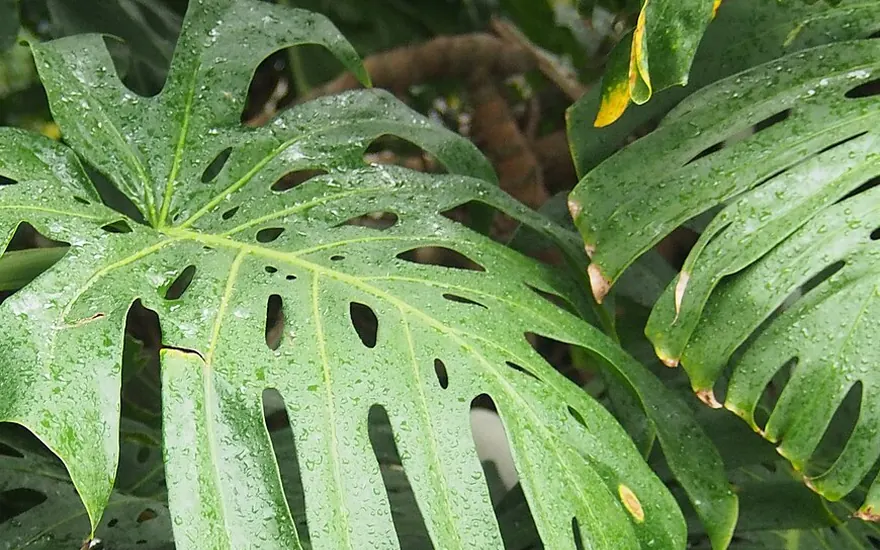
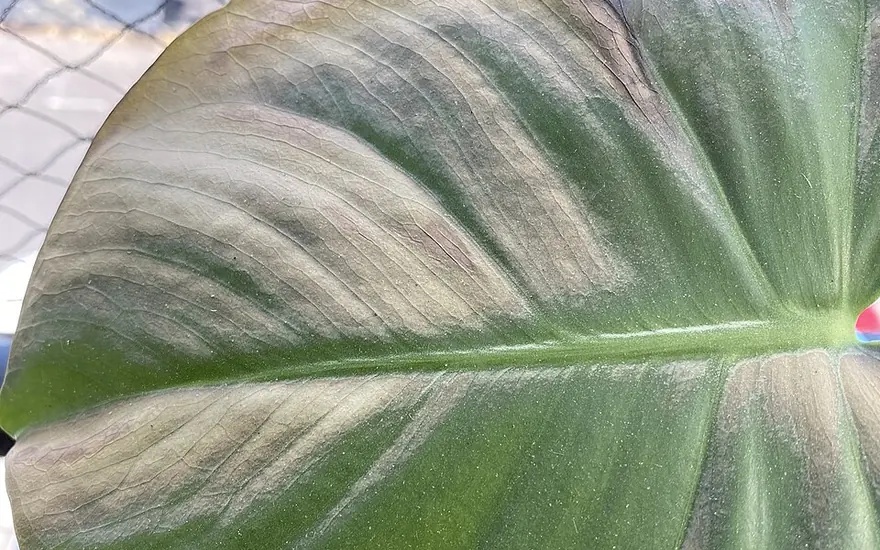
Drag to compare. Two Monstera deliciosa specimens — scorch damage on one side, a healthy leaf on the other. This is the difference the scan is reading.
Detected on Fiddle Leaf Fig
What caused this
Treatment plan
For reference only. Consult a professional for severe cases or valuable plants.
A generic “water your plants” ping is how plants die. Schedules are built per species and adjusted for pot size, indoor or outdoor, and the season.
System notifications at 09:00 local, one per plant per task — watering, feeding, repotting, misting. They survive a reboot. Grouped overdue / today / tomorrow, one tap to clear.
Three separate cycles per plant — watering, fertilising, repotting — each with its own interval you can tune day by day.
Advice shifts with the season and your region, because a Monstera in February is not a Monstera in July.
Consecutive days you kept up, on a 30-day heatmap. A 30-day streak earns Green Thumb.
Today’s care — My Garden
MontyMonstera deliciosa · overdue 1 day
Water
Basil — kitchen sillOcimum basilicum · due today · pet-safe
Water
 Snake PlantDracaena trifasciata · next in 6 days
Done
Snake PlantDracaena trifasciata · next in 6 days
Done
A searchable database with taxonomy, native range, description and care summary — built on Wikipedia, iNaturalist, GBIF and Trefle, each credited.
Browse by category or A–Z, or search by name. Each entry carries common and scientific names, family, origin, description and a care summary.
What grows locally, what’s blooming this month, and which species near you are threatened. Location is optional.
Indoor or outdoor, light, water need, pet-safe, edible, flower colour, difficulty — and native-to-my-area.
Seven guides on the things that actually kill houseplants: reading when a plant needs water, spotting leaf disease early, choosing pet-safe plants, surviving low light, when to repot, and spring indoor care.
Species you’ve identified accumulate into a collection with milestones at 10, 50, 100, 250 and 500. Twenty-one badges across four tracks — streaks, garden size, species found and care logged — plus a 30-day watering heatmap.
Trefle and GBIF taxonomy, with Wikipedia descriptions.
English, Spanish, Portuguese, French, German, Italian, Russian, Japanese, Korean, Chinese, Hindi, Arabic, Turkish, Vietnamese, Indonesian.
Not one confident guess. You see the runners-up and can report a wrong result.
No sign-up screen exists. Your garden, care schedules and scan history live in a local database on the phone, and Settings has a one-tap “delete all data”.
The row that matters most isn’t the price — it’s whether a card is required before you can use the thing you downloaded it for.
| Plant Identifier: Plant Care | PictureThis | Planta | PlantIn | Plantum | |
|---|---|---|---|---|---|
| Free AI scans, no card | 3 | Trial-gated | Trial-gated | Trial-gated | Trial-gated |
| Care plan after the ID | Free | Paid | Paid | Paid | Paid |
| Pet & child toxicity | Free | Paid / absent | Absent | Paid | Paid |
| Watering reminders | Free, no cap | Paid | Paid | Paid | Paid |
| Disease diagnosis | Uses a free scan | Paid | Paid | Paid | Paid |
| Card required to start | No | Usually yes | Usually yes | Usually yes | Usually yes |
| Yearly price | $19.99 | $39.99 | $47.99 | ~$35 | $6.99 / week |
| One-time lifetime option | $69.99 | — | — | — | — |
Competitor pricing and gating collected from public Google Play and App Store listings. Prices vary by country and change over time. Free-tier limits reflect this app’s default configuration.
Twelve situations the app was built around — drawn from what plant owners actually ask and complain about in this category.
The kitten chews everything. I need to know what is in the room before I bring a plant home.
I water everything on Sunday. Half of them clearly hate that.
Brown edges appeared over one week and I cannot tell if that is water, light or a bug.
The last app named my plant, then wanted a yearly subscription to tell me how to keep it alive.
It came with the flat. Nobody knows what it is or when it was last watered.
First plant. I would quite like it not to be my last.
He puts everything in his mouth. Same question every time I see a new plant in the house.
North-facing flat. I keep buying plants that need light I do not have.
Which ones survive a holiday and which need a neighbour with a key?
Found this on a path and just want to know what it is. Not planning to eat it.
Someone gave me an orchid. I am told they are difficult.
I do not need another hobby. I need a reminder that actually arrives.
Nothing here is a trial that quietly becomes a subscription. Premium is a separate, deliberate purchase inside Google Play — and it buys volume, not features.
$0 forever
No account, no trial, no payment method. Supported by ads.
Ads appear between scans. The 3 free scans are a one-time allowance, not a daily reset — after that, scanning needs Premium. Everything else in the list above stays free.
$19.99 billed once per year
That is the actual charge — about $1.67 a month, but you are billed $19.99 one time, once a year. Also available at $2.99 per week, or $69.99 once for lifetime access that never renews.
That is deliberately the whole list. Premium lifts the scan cap and removes the ads — it does not unlock the care plan, the safety verdicts, the reminders or the encyclopedia, because those were never locked.
See Premium in the appBilling is handled by Google Play, which shows the price and the renewal date before you confirm. Subscriptions renew until cancelled; cancel any time in Play › Subscriptions and you keep access until the period ends. The lifetime purchase never renews. Prices shown in USD and may vary by country.
No. There is no trial to convert. The free tier is permanent and never asks for a payment method. Premium is a separate, explicit purchase in Google Play.
No — and this is the main reason the app exists. The full care card, the care guide and the pet-toxicity verdict arrive with every result, free ones included. Premium only lifts the scan cap and removes ads.
You see the top three matches with a confidence percentage each, so a weak match looks weak. There is a “report incorrect result” action on every result screen.
Every identification returns separate verdicts for dogs, cats and children. It is reference information, not veterinary advice — if your pet has already eaten something, call your vet or a poison-control line first.
No, and we won’t add that. There are growing and harvest guides for herbs and vegetables you chose to plant, but the app does not judge the edibility of wild plants or mushrooms.
Scanning needs a connection — the analysis runs in the cloud. Your garden, reminders, schedules and history all work offline because they live on the phone. There is no account, and Settings can wipe everything in one tap. Location is optional and only powers “plants near you”.
Google Play Store › Menu › Subscriptions › select the subscription › Cancel. Deleting the app does not cancel a subscription. The lifetime purchase has nothing to cancel.